Reduce manual effort, minimize errors, and improve productivity for every team.
✓ Create work items instantly using reusable, customizable templates.
✓ Standardize the creation of tasks, stories, bugs, epics, and other work item types across projects
✓ Reduce manual effort, minimize errors, and improve productivity for every team.
Stop Creating the Same Work Items Over and Over Again
THE PROBLEM — Creating the Same Jira Work Items Manually
Creating the same work items over and over again wastes valuable time and leads to inconsistent results.
- Repeatedly create the same Bugs, Tasks, Stories, and Sub-tasks
- Manually enter the same summaries, descriptions, and field values
- Teams waste time copying and pasting content
- Risk missing important fields or information
- Spend time recreating work that has already been defined
- Slow down repetitive processes and everyday Jira workflows
⭐ THE TRANSFORMATION : Faster, Consistent, Standardized Work Item Creation
With Advanced Work Item Templates for Jira Free you get:
- Reusable work item templates Create templates once and reuse them whenever you need the same structure.
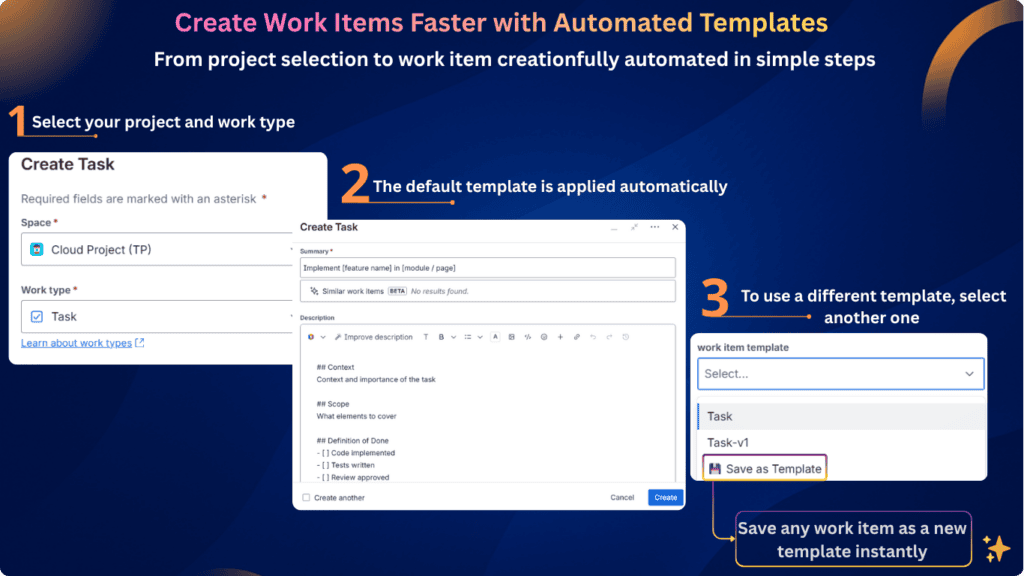
- Faster work item creation Automatically pre-fill summaries, descriptions, priorities, labels, and other predefined fields.
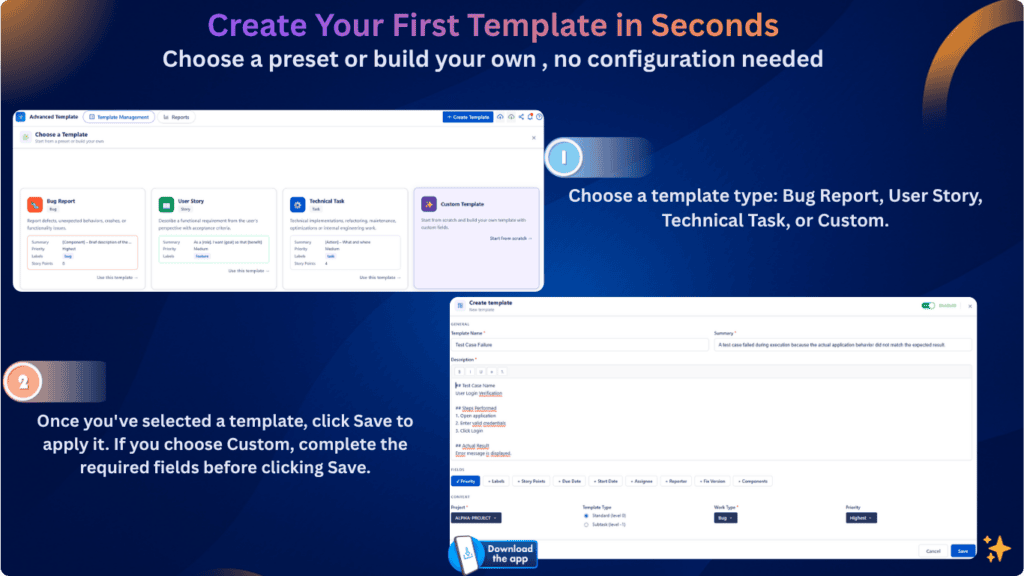
- Ready-to-use templates Start quickly with predefined Bug Report, User Story, and Technical Task templates.
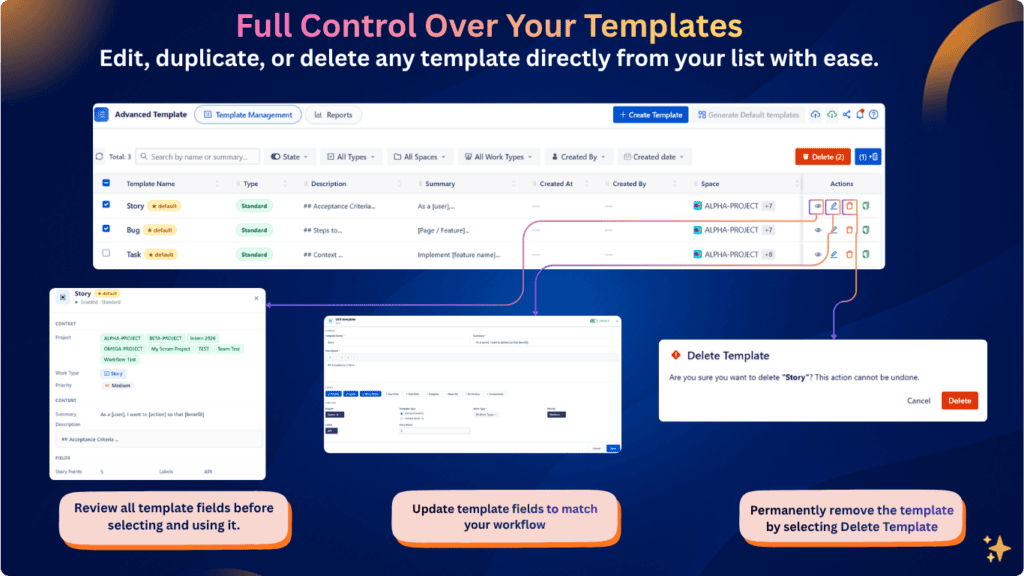
- Flexible template management Search, filter, enable, disable, duplicate, and manage templates from one place.
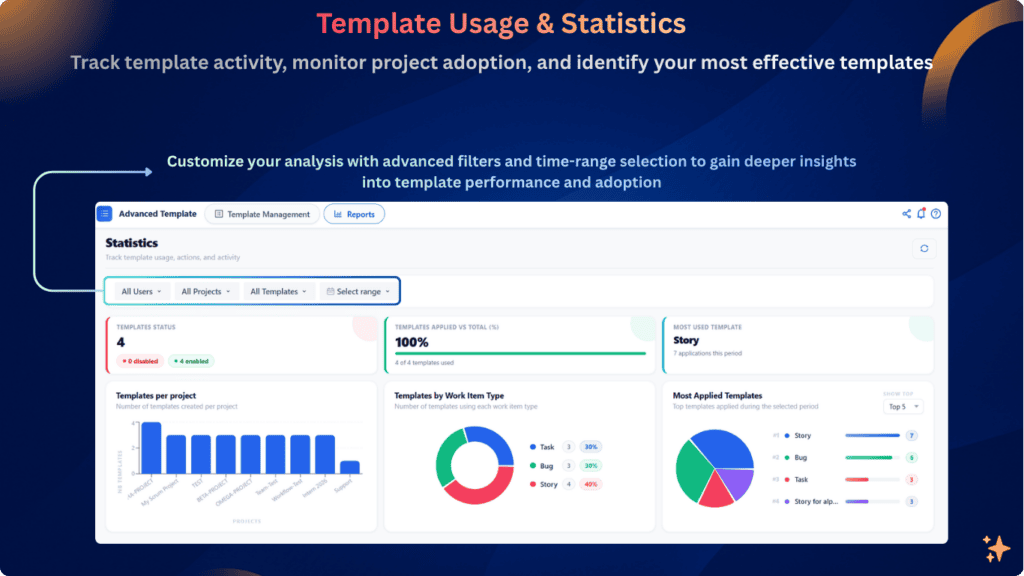
- Template insights Track usage, identify your most-used templates, and monitor adoption across projects.
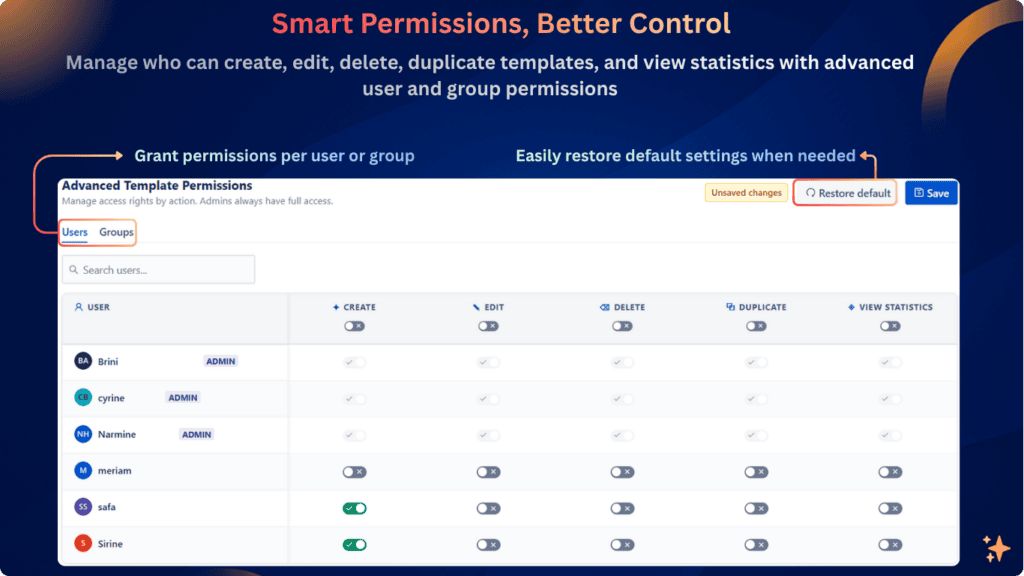
- Controlled access Manage who can create, edit, delete, duplicate templates, or view statistics.
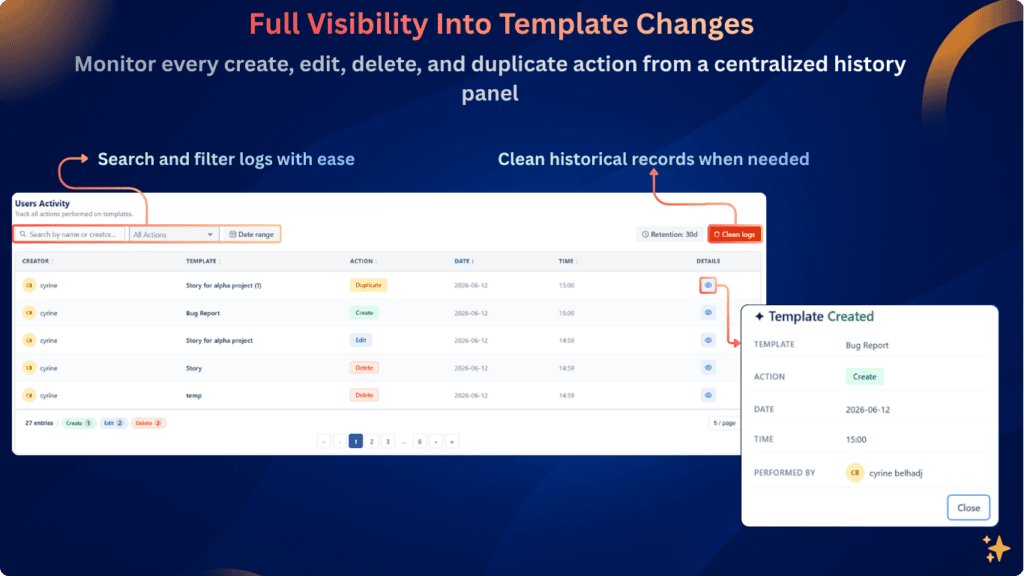
- Complete activity history Keep track of template actions with a detailed audit trail.
THE SOLUTION:
Advanced Work Item Templates for Jira
Save time with reusable templates that instantly populate summaries, descriptions, and predefined fields.
Create Work Items in Seconds with Smart Templates
Eliminate repetitive work by using reusable templates that instantly populate summaries, descriptions, and other predefined fields.
Full Control Over Your Templates
Manage your templates with ease from a single location. Create, edit, duplicate, or delete templates in just a few clicks. Organize your templates, keep them up to date, and quickly adapt them to your team’s evolving workflows.
Standardize Work Creation Across Jira
Ensure consistency across teams and projects by using reusable templates throughout your Jira instance. Browse, search, and filter templates to quickly find the right one, reduce manual errors, and maintain standardized work item creation across every project.
Why Advanced Work Item Templates for Jira Free
Creating work items in Jira shouldn’t mean starting from scratch every time.
Without a standardized approach, teams often recreate the same tasks manually, copy information from old issues, and enter the same fields repeatedly. Over time, this can lead to inconsistent structures, missing information, and unnecessary effort.
Advanced Work Item Templates for Jira Free gives your team a smarter way to create consistent work items using reusable templates.
Create once. Reuse whenever you need it. Less repetition. More consistency. Faster work.
Track Template Usage and Improve Your Team’s Workflow
Monitor template adoption, discover your most-used templates, and analyze usage across projects to ensure your teams work consistently and efficiently.
Take Full Control of Template Permissions
Manage access at the user or group level and control who can create, edit, delete, duplicate templates, or view usage statistics.
Stay in Control with a Complete Audit Trail
Keep full visibility into template activity, from creation and edits to duplication and deletion, with detailed logs and flexible filters.
Quality speaks itself
FAQ
Go to Apps → Advanced Work Item Templates for Jira → Create Template. You can start from a ready-to-use template or create one from scratch, then define the fields and work item type you need.
Yes. Create a template once and reuse it whenever you need to create the same type of work item.
You can create templates for Bugs, Tasks, Stories, Sub-tasks, and other work item types available in your Jira projects.
Yes. You can build a custom template and define its summary, description, project, work item type, priority, labels, assignee, due date, and other supported fields.

Yes. The app includes ready-to-use templates such as Bug Report, User Story, and Technical Task, which you can use as a starting point.
Yes. Existing templates can be edited to match your team’s specific requirements.
Yes. Each template has an Enable/Disable toggle, allowing you to control which templates are active and available for use.
Yes. Jira administrators can assign permissions at both user and group level, including Create, Edit, Delete, Duplicate, and View Statistics.
Yes. The History section provides an audit trail of template activities, including creation, editing, deletion, and duplication.
Yes. The Reports & Statistics section provides insights into template adoption, most-used templates, usage by project, and usage by work item type.
Yes. You can create Sub-task templates and associate them with the appropriate parent work item.
No. Once installed, the app is ready to use with default templates available.

H&B Proves That Colored Label Manager is for Business Teams as well as Devs

Horoquartz Says Colored label Manager is Actually improving Users’ Lives