
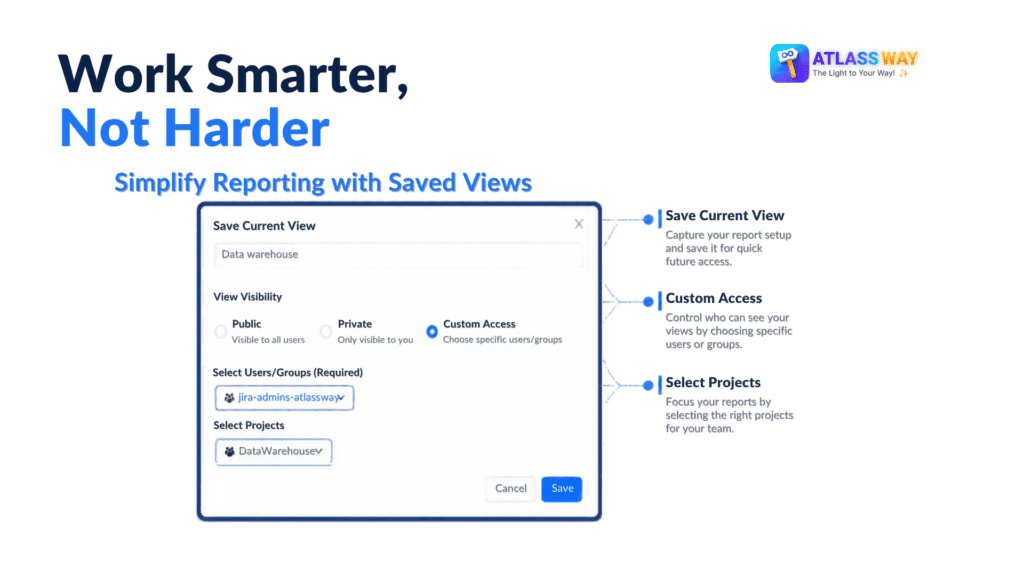
Saved Views in Time In Status helps you streamline your reporting workflow by letting you save, reuse, and organize your preferred report configurations. From personal analyses to shared team views, you can quickly return to the information you need and keep your reporting consistent as your priorities evolve.
Every team has different reporting needs. You might need one view to monitor time spent in each status, another to investigate workflow bottlenecks, and a third to review work items requiring attention.
With Saved Views, you can preserve your preferred filters, table configuration, and optional highlights in a reusable view. Instead of rebuilding your report each time, simply return to your saved configuration and continue your analysis.
You can also control who has access to each view. Keep it private for individual analysis, make it public for broader visibility, or share it with selected users and groups. When needed, associate a view with a specific project to make it available in that project’s context.
Managing reports across multiple Jira projects can quickly become confusing, especially when similar views serve different teams or workflows.
Saved Views makes project-specific configurations easier to identify. Views associated with a project also appear in the Global Saved Views list, with the project key displayed beneath the view name. This additional context helps you distinguish between views and navigate to the right reporting setup more efficiently.
Whether you manage one project or several, you can keep your preferred views accessible without losing track of where they belong.
Reporting requirements rarely remain the same. As projects progress and priorities shift, you may need to refine existing configurations, rename views, or remove outdated ones.
Saved Views lets you update existing views, change their names, and adjust available settings such as visibility and whether highlights are included. You can also delete views that are no longer useful, keeping your reporting workspace relevant and easy to navigate.
These capabilities help you maintain a useful collection of report configurations without starting over whenever your needs change.
Not every saved view needs to remain visible all the time. Some configurations may be useful only for occasional reviews, while others are part of your daily workflow.
With the hide and show controls, you can hide views you rarely use, including views shared by other users, without deleting them. When you need them again, display hidden views and restore individual entries to your list.
Saved Views makes it easier to switch between different reporting perspectives. Load a saved view to restore its associated filters and settings, then move to another view when you need to investigate a different aspect of your workflow.
When you’re ready to return to the default report, you can clear the current view and start with a broader perspective.
This flexibility is particularly valuable for teams that regularly switch between monitoring performance, reviewing project progress, and investigating delays.
Effective reporting should help teams understand their work, not require them to repeatedly prepare the same analysis. By making report configurations reusable, Saved Views reduces repetitive setup and helps teams maintain a more consistent approach to Jira reporting.
Whether you’re a project manager tracking progress, a Jira administrator organizing project reports, or a team member investigating workflow performance, Saved Views helps you spend less time configuring reports and more time turning data into meaningful insights.
Make your Jira reporting simpler, more consistent, and easier to manage. Explore Time In Status – Smart Alerts and Reports and build a reporting workflow that works for you.
Looking for more ways to optimize your Jira experience? Explore our full range of Atlassway apps and discover powerful solutions designed to simplify workflows, improve productivity, and help you get more from Jira