


Advanced Link Manager for Jira

The Most Powerful Way to Manage Linked Issues, Link Types, and Dependencies in Jira Cloud

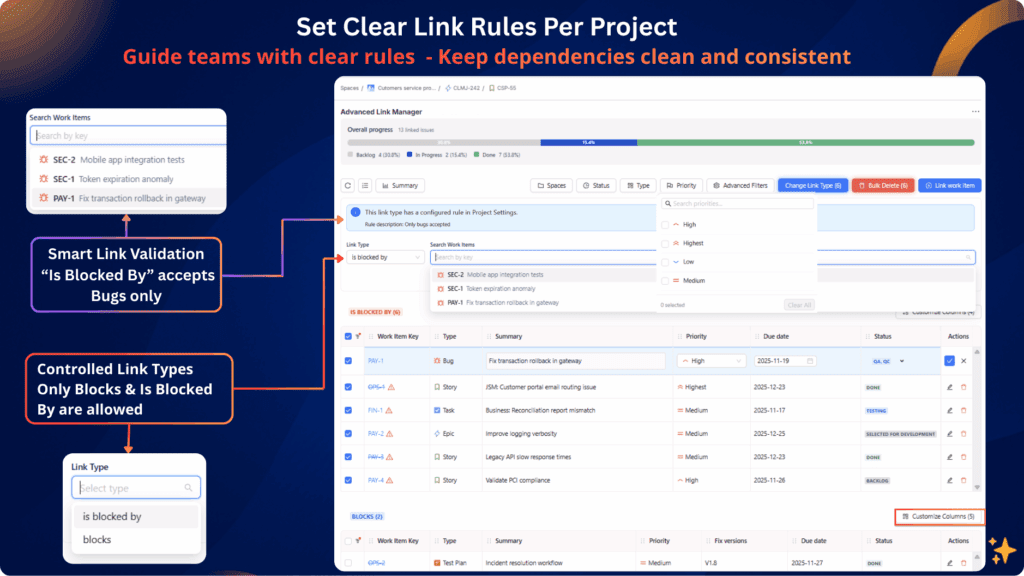
Screenshot of the Advanced Link Manager in Jira Cloud showing project-level link rules, controlled link types, and smart validation. The interface displays filters, allowed link types, warnings for invalid links, and settings that restrict “Is Blocked By” to Bugs only.

Stop letting users link anything, anywhere, anyhow.
Create a clear, consistent, and visual link structure that everyone understands.

The #1 Jira Cloud app for managing linked issues, controlling link types, and visualizing dependencies all inside the Jira issue view.

Advanced Link Manager for Jira turns links from chaos into clarity. Now, every project can have its own link standards, visual rules, and logic, all defined by the project manager.

THE PROBLEM — Native Jira Linked Issues Are Difficult to Manage

Linked issues in Jira Cloud quickly become messy:

**Jira Cloud simply wasn’t built for link governance or dependency management.

This app fixes that.**

⭐ THE TRANSFORMATION : Clear, Structured, Governed Linked Issues

With Advanced Link Manager for Jira you get :

THE SOLUTION, Advanced Link Management for Jira Cloud

Everything you need to manage linked issues properly, all in the issue view.
Screenshot of the Advanced Link Manager in Jira Cloud showing project-level link rules, controlled link types, and smart validation. The interface displays filters, allowed link types, warnings for invalid links, and settings that restrict “Is Blocked By” to Bugs only.

This solves one of Jira’s biggest limitations.

Fix Incorrect Links in One Click

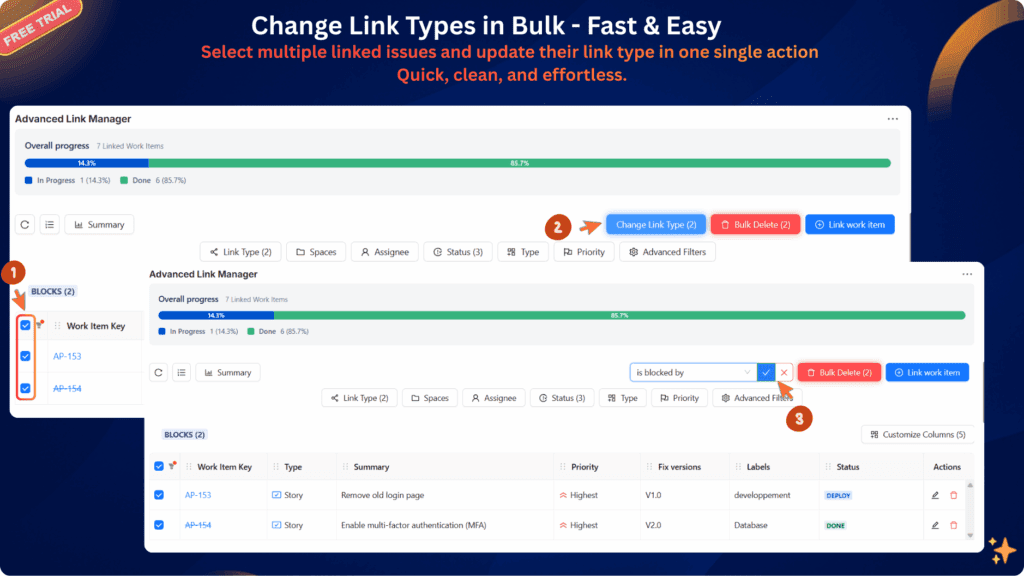
Change link types without removing them

This is essential for data quality and accurate reporting.

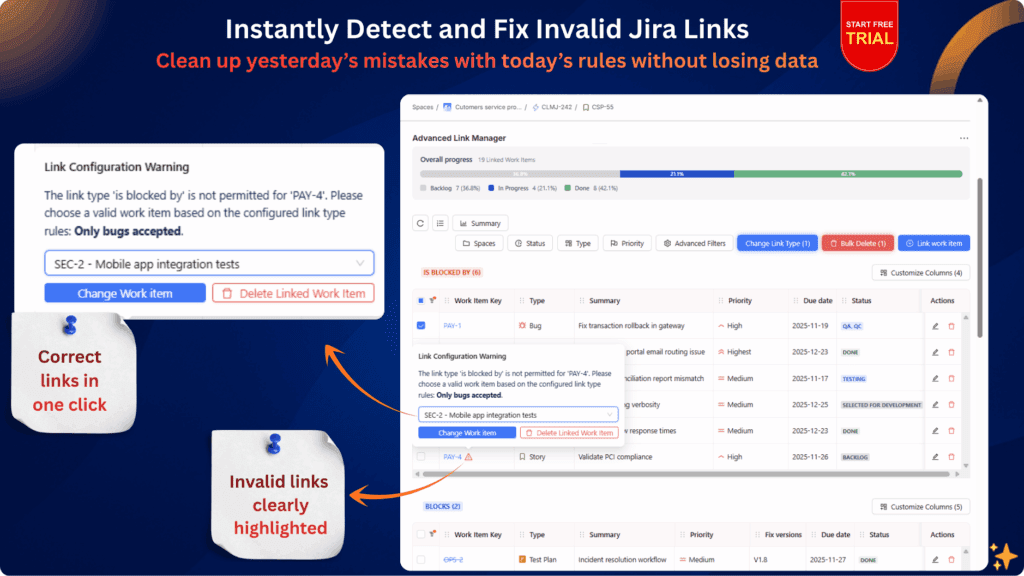
Screenshot of a Jira Cloud plugin interface showing invalid issue links highlighted with warnings, a progress bar, filtering options, and one-click actions to correct or delete incorrect links based on configured linking rules.

Why Advanced Link Manager For Jira

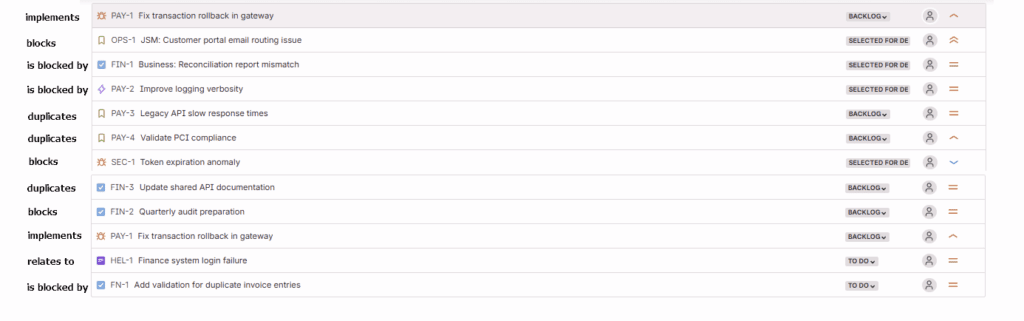
Jira is great for connecting issues — until your team starts linking them randomly. Some link “blocks” when they mean “relates.” Others create custom link types with no structure. Soon, you have hundreds of inconsistent links that no one understands. Your Jira turns into a tangled web — not a traceable workflow. Teams can’t trust what dependencies mean. Managers can’t report on relationships. Admins lose control.

Bulk Actions for Large-Scale Cleanup

Essential for enterprise teams with thousands of issues.

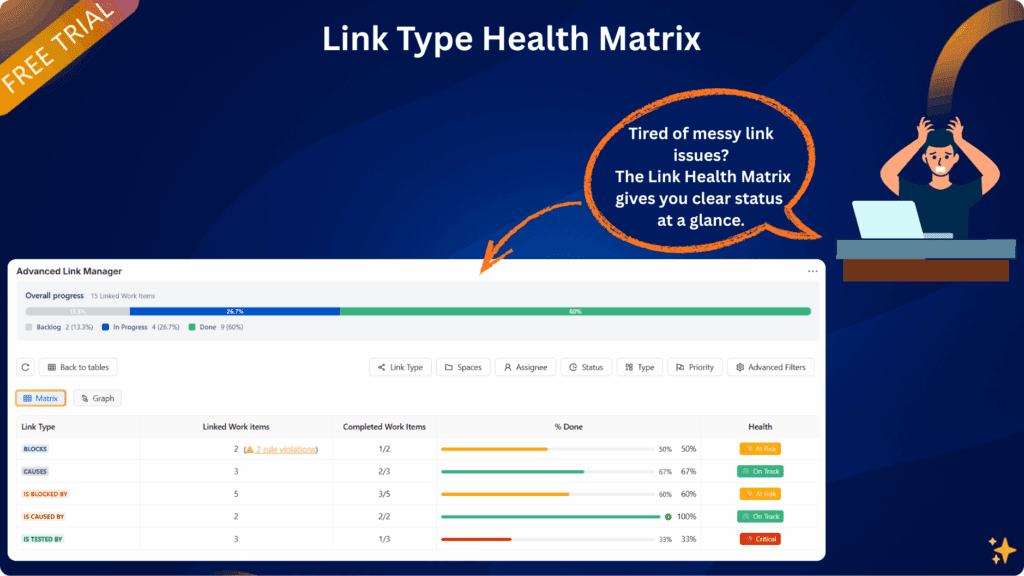
Dependency Matrix View

See all dependencies in a structured grid

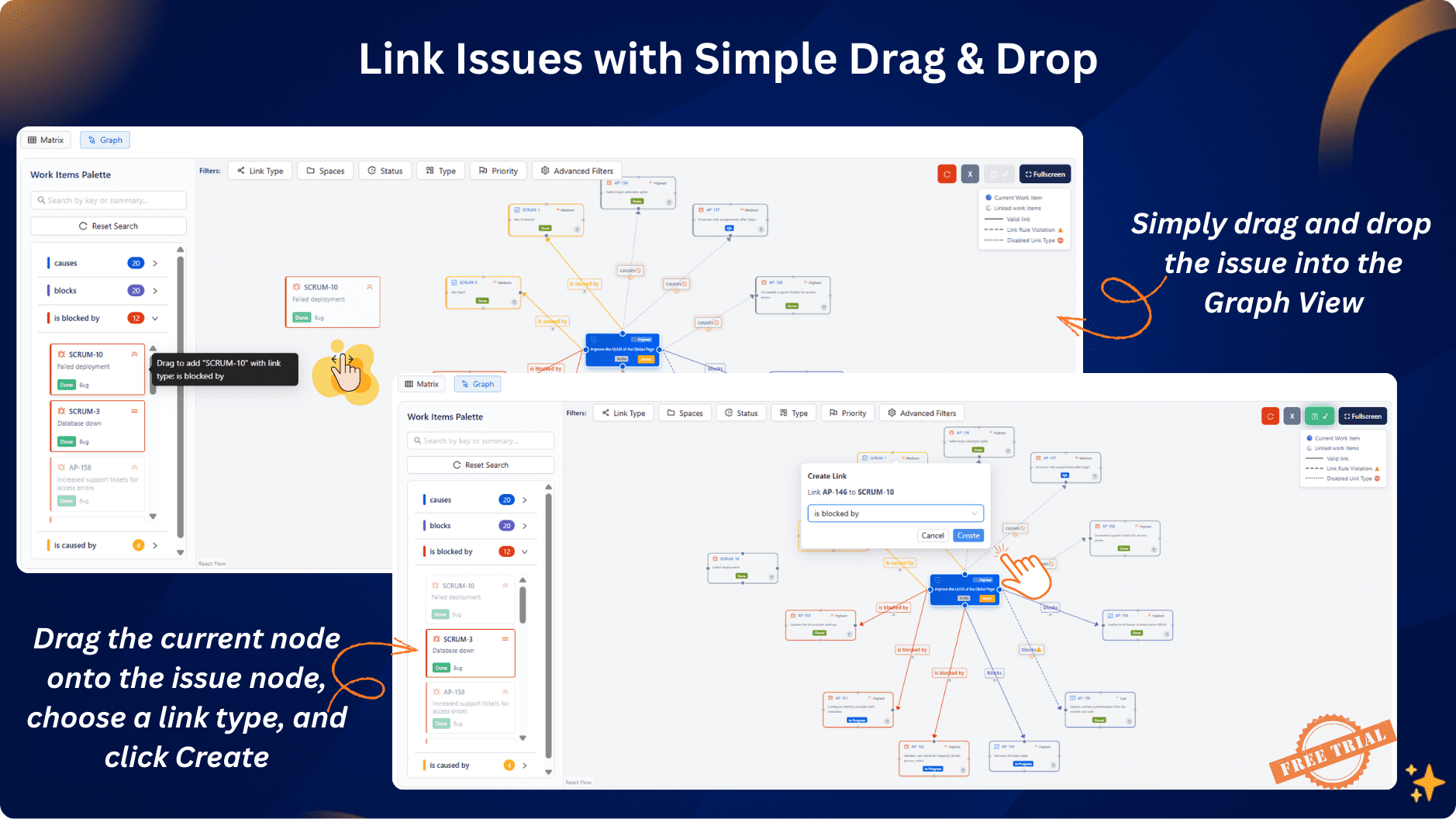
Dependency Graph View

Visualize relationships using a dynamic graph:

Quality speaks itself

FAQ

Jira does not provide advanced link management natively.
Advanced Link Manager for Jira adds grouping, ordering, link-type validation, visualizations, and governance , all directly inside the issue view. You get full control without leaving the work item.

Jira does not support reordering out of the box.
This app adds drag-and-drop ordering, allowing you to prioritize links, move critical dependencies to the top, and organize long lists instantly.

Natively, Jira cannot restrict link types by project.
With Advanced Link Manager, you can define allowed link types per project and block or warn users when they attempt to create an unauthorized link.

Yes, with this app.
The system automatically flags, warns, and blocks link types that violate your project’s rules, preventing dependency pollution and improving governance.

The app identifies historical issues with:

  • incorrect link types,

  • reversed direction (e.g., Blocks vs Blocked By),

  • cross-project violations,

  • duplicate or messy links.

You can fix them instantly using:
→ One-click link-type change
→ Bulk cleanup
→ Drag-and-drop restructuring

The app provides two advanced visualizations:

Matrix View:
Audit, analyze, and standardize linking patterns across teams.

Graph View:
Interactive dependency graph to understand cross-project relationships visually.

Yes, fully.
The app supports TM and CM projects with no configuration needed.

Yes.
Being a full Forge app means:

  • data never leaves Atlassian’s infrastructure,

  • enterprise-grade isolation,

  • no external storage,

  • excellent performance,

  • native integration with Jira Cloud.

Forge = highest security standards available on Marketplace.

Yes, it supports both Jira Software and Jira Service Management.
It enhances linked issues in all issue types and all teams.

Yes.
You can apply governance rules across many projects, enforce standardized linking behavior, and control cross-project dependencies at scale — ideal for enterprises and PMOs.

Yes , this app includes a built-in dependency graph view directly inside the issue, allowing you to explore relationships visually without switching tabs or using external tools.

Yes , the matrix view in Advanced Link Manager provides a clear dependency grid that highlights link types, patterns, and anomalies across issues or projects.

The app automatically detects:

  • unauthorized links,

  • wrong types,

  • missing direction,

  • duplicates,

  • cross-project violations.

You can fix them with bulk tools or warnings inside each issue.

Admins can define:

  • allowed link types per project,

  • automatic warnings,

  • blocking rules,

  • cross-project restrictions,

  • standardized structures.

All users see consistent, governed link behavior.

Yes.
Advanced Link Manager lets you convert link types (e.g., “Relates To → Blocks”) in one click — no need to delete and recreate links.

It enhances and upgrades it with:

  • grouping,

  • ordering,

  • validation,

  • visual hierarchy,

  • warnings,

  • and advanced tools.

You stay in the same place but gain full control.

Absolutely.
It’s designed for organizations with:

  • complex architectures,

  • cross-project dependencies,

  • portfolio-level governance,

  • PMO oversight,

  • strict data quality requirements.

Yes, by enforcing clean, consistent link types, your dependency and blockage reports become dramatically more reliable.

No , it is optimized with Forge for:

  • fast loading,

  • incremental rendering,

  • smooth performance even with long link lists.

Yes , send any Jira ticket or Atlassian documentation, and I can:

  • verify compatibility,

  • interpret the feature,

  • add support inside the app,

  • or help rewrite documentation for your product page.

Join our newsletter

Insights on Jira apps, expert tips & product updates.