
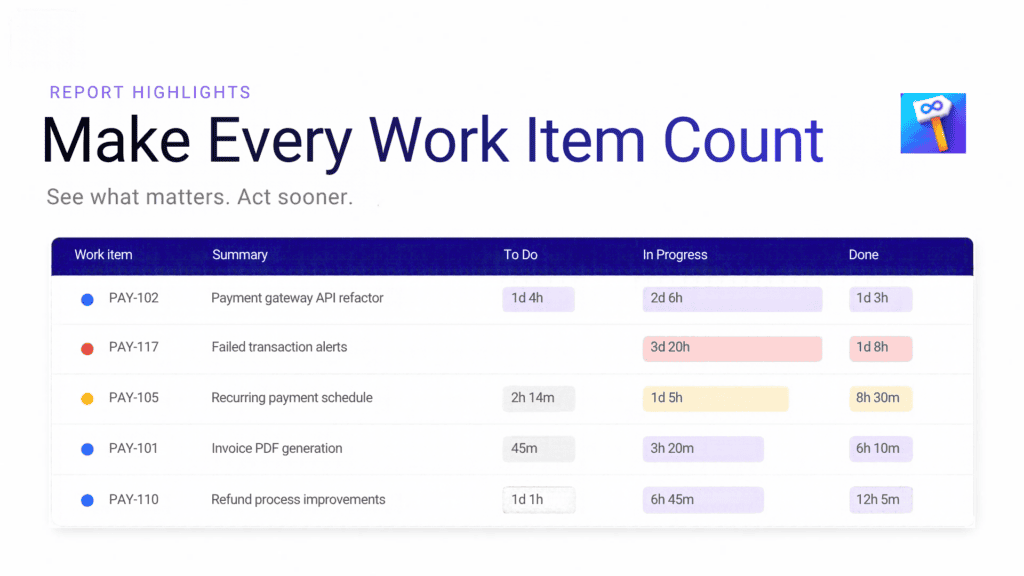
Report Highlights help you identify significant data directly in your reports. Whether you want to monitor time spent in a status, identify potential SLA risks, or track other important metrics, highlights make relevant information easier to recognize.
For example, support teams can highlight work items approaching SLA deadlines, while project managers can identify work items that have remained in progress longer than expected.
Instead of manually reviewing every row, your team can quickly spot potential problems and decide where to focus its efforts.
You don’t need to configure every highlight from scratch. Time in status comes with predefined highlights to help you get started.
Use these defaults as they are, disable the ones you don’t need, or delete them to keep your reports relevant to your workflow. You can also create custom highlights tailored to your team’s specific requirements.
Every team has different priorities. Report Highlights lets you configure the appearance and purpose of each highlight to make important information easier to understand.
When creating a highlight, you can define its name and description, select the applicable report type, and choose how it should appear.
Choose between two styling options:
You can also enable animated borders for Advanced styles to give selected highlights additional visual emphasis.
Report Highlights gives you the flexibility to manage what appears in your reports without losing your configurations.
Disabled highlights retain their settings, allowing you to reactivate them whenever needed.
When you need a more focused view, use Show Only Highlighted Work Items to filter your report table.
Once enabled, the table displays only work items matching active highlights. This is particularly useful during team meetings, sprint reviews, and support follow-ups, when you want to concentrate on exceptions rather than review the entire report.
Disable the option to return to the full list whenever you need a broader overview.
Report Highlights helps teams move from reviewing data to acting on it. By making important metrics more visible and allowing you to focus on specific work items, it becomes easier to identify bottlenecks, monitor performance, and prioritize follow-up actions.
Whether you’re managing support requests, tracking workflow efficiency, or reviewing team performance, Time In Status – Smart Alerts and Reports helps you turn Jira reporting into a more focused and practical decision-making tool.
Looking for more ways to optimize your Jira experience? Explore our full range of Atlassway apps and discover powerful solutions designed to simplify workflows, improve productivity, and help you get more from Jira